命令
查看历史与差异
1
2
3
4
5
6
7
| git log
git log --oneline
git log --graph
git show <commit>
git diff
git diff --staged
|
分支操作
1
2
3
4
5
6
7
8
9
10
11
| git branch
git branch -a
git branch <name>
git checkout <name>
git switch <name>
git checkout -b <n>
git switch -c <n>
git branch -d <name>
|
合并 & 变基
1
2
3
| git merge <branch>
git merge --abort
git rebase <branch>
|
远程仓库
1
2
3
4
5
6
7
8
9
| git remote -v
git remote add origin <url>
git fetch
git pull
git push
git push origin main
git push -u origin main
|
查看 / 修改 URL
1
2
| git remote get-url origin
git remote set-url origin git@github.com:xxx/yyy.git
|
上游仓库
1
2
3
4
5
6
7
8
9
10
11
|
git remote add upstream https://github.com/original/repo.git
git remote -v
git fetch upstream
git checkout master
git merge upstream/master
git push origin master
|
撤销 & 回退
回退提交
1
2
3
| git reset --soft HEAD~1
git reset --mixed HEAD~1
git reset --hard HEAD~1
|
安全回退
修改上次提交标题
1
| git commit --amend -m "新的提交标题"
|
标签
1
2
3
4
| git tag
git tag v1.0.0
git tag -a v1.0 -m "v1"
git push origin --tags
|
配置相关
配置用户名和邮箱
1
2
3
4
| git config --global user.name "Your Name"
git config --global user.email "xx@xx.com"
git config --list
|
设置代理
设置 HTTP 和 HTTPS 代理
1
2
| git config --global http.proxy http://127.0.0.1:8080
git config --global https.proxy http://127.0.0.1:8080
|
如果代理需要用户名和密码验证:
1
2
| git config --global http.proxy http://username:password@127.0.0.1:8080
git config --global https.proxy https://username:password@127.0.0.1:8080
|
取消代理
1
2
| git config --global --unset http.proxy
git config --global --unset https.proxy
|
用SSH密钥对commit签名
1
2
3
| git config commit.gpgsign true
git config gpg.format ssh
git config user.signingkey <ssh私钥路径>
|
回滚强制撤销
若不小心执行git reset --hard HEAD~1,可以使用git reflog查看本地仓库 HEAD 的移动历史,随后使用git cherry-pick <commit-hash>将更改应用回来
只在已提交后生效,若没提交就无法找回
Git LFS
使用以下命令初始化:
设置那些文件会使用LFS
1
2
3
4
|
git lfs track "PPT/*.jpg"
git lfs track "PPT/**/*.jpg"
|
执行上述命令后会将配置写入.gitattributes
1
2
| PPT/**/*.pdf filter=lfs diff=lfs merge=lfs -text
PPT/**/*.jpg filter=lfs diff=lfs merge=lfs -text
|
-text不是命令中的参数,而是由两部分组成的属性,text表示这是一个文本,添加-表示取反。同样的表示有:
-text:不需要转换换行符-diff:不需要对比代码差异-merge:不需要在冲突时自动合并
报错类
报错:error: You have not concluded your merge (MERGE_HEAD exists).
$
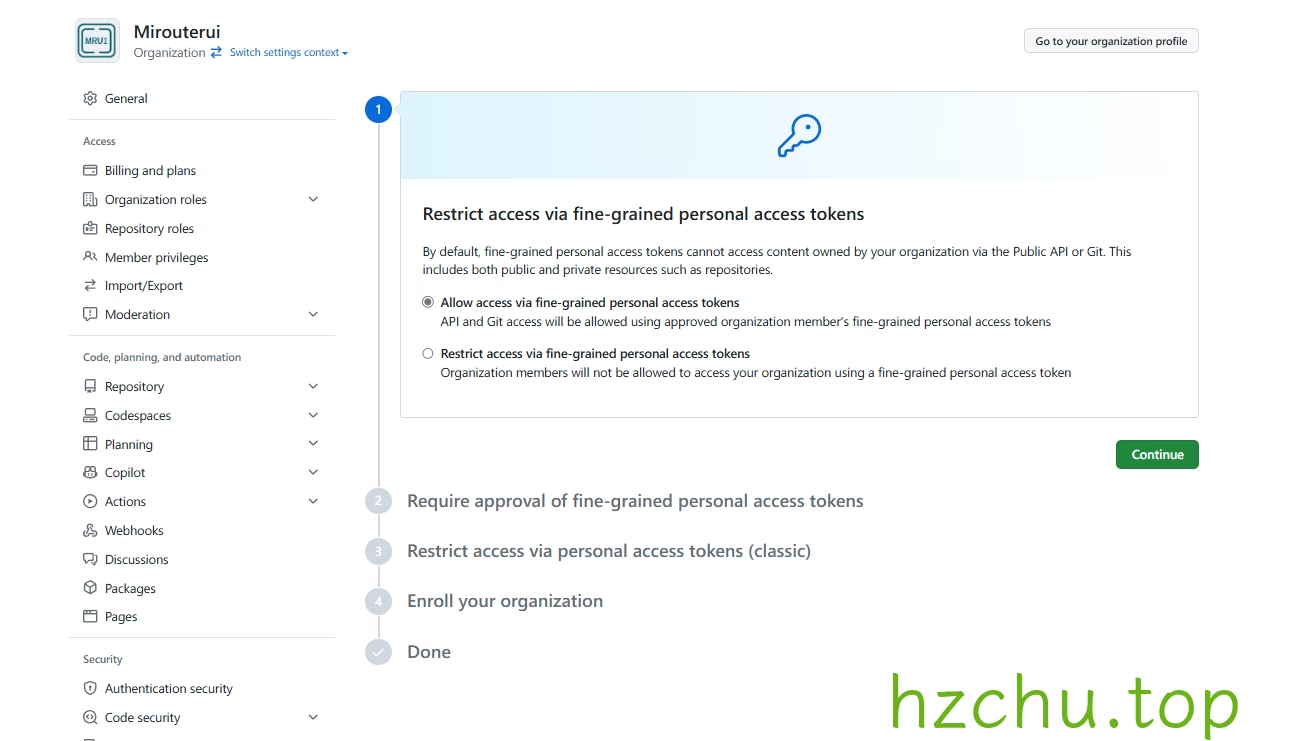
无权限写入组织仓库(GitHub)
完成组织权限设置
Snipaste_2024-07-13_08-25-06
新建一个New fine-grained personal access token,Resource owner选择组织,权限处给予contents的读写权限
如果组织权限设置中开启了批准,则需回去在Pending requests里面启用
在本地仓库中运行:
git remote set-url origin https://{token}@github.com/{user}/{repo}.git
全局rebase导致合并完成后又有冲突
1
2
3
4
5
6
7
8
|
git rebase --abort
git push origin myself
git config pull.rebase false
|
ssh卡住
1
2
3
4
5
6
7
8
9
10
11
12
13
14
15
16
17
18
19
20
21
22
23
24
25
26
27
28
29
30
31
32
33
34
35
| (base) aaa@aaa:~/project/apibox$ GIT_SSH_COMMAND="ssh -v" git push origin v1.9.0
OpenSSH_8.9p1 Ubuntu-3ubuntu0.13, OpenSSL 3.0.2 15 Mar 2022
debug1: Reading configuration data /etc/ssh/ssh_config
debug1: /etc/ssh/ssh_config line 19: include /etc/ssh/ssh_config.d/*.conf matched no files
debug1: /etc/ssh/ssh_config line 21: Applying options for *
debug1: Connecting to github.com [172.182.252.133] port 22.
debug1: Connection established.
debug1: identity file /home/aaa/.ssh/id_rsa type 0
debug1: identity file /home/aaa/.ssh/id_rsa-cert type -1
debug1: identity file /home/aaa/.ssh/id_ecdsa type -1
debug1: identity file /home/aaa/.ssh/id_ecdsa-cert type -1
debug1: identity file /home/aaa/.ssh/id_ecdsa_sk type -1
debug1: identity file /home/aaa/.ssh/id_ecdsa_sk-cert type -1
debug1: identity file /home/aaa/.ssh/id_ed25519 type -1
debug1: identity file /home/aaa/.ssh/id_ed25519-cert type -1
debug1: identity file /home/aaa/.ssh/id_ed25519_sk type -1
debug1: identity file /home/aaa/.ssh/id_ed25519_sk-cert type -1
debug1: identity file /home/aaa/.ssh/id_xmss type -1
debug1: identity file /home/aaa/.ssh/id_xmss-cert type -1
debug1: identity file /home/aaa/.ssh/id_dsa type -1
debug1: identity file /home/aaa/.ssh/id_dsa-cert type -1
debug1: Local version string SSH-2.0-OpenSSH_8.9p1 Ubuntu-3ubuntu0.13
debug1: Remote protocol version 2.0, remote software version feb815a
debug1: compat_banner: no match: feb815a
debug1: Authenticating to github.com:22 as 'git'
debug1: load_hostkeys: fopen /home/aaa/.ssh/known_hosts2: No such file or directory
debug1: load_hostkeys: fopen /etc/ssh/ssh_known_hosts: No such file or directory
debug1: load_hostkeys: fopen /etc/ssh/ssh_known_hosts2: No such file or directory
debug1: SSH2_MSG_KEXINIT sent
debug1: SSH2_MSG_KEXINIT received
debug1: kex: algorithm: curve25519-sha256
debug1: kex: host key algorithm: ssh-ed25519
debug1: kex: server->client cipher: chacha20-poly1305@openssh.com MAC: <implicit> compression: none
debug1: kex: client->server cipher: chacha20-poly1305@openssh.com MAC: <implicit> compression: none
debug1: expecting SSH2_MSG_KEX_ECDH_REPLY
|
1
2
3
4
5
6
7
8
| nano ~/.ssh/config
Host github.com
Hostname ssh.github.com
Port 443
User git
IPQoS 0x00
|
参考资料
- Git基础 - git tag 一文真正的搞懂git标签的使用
- 创建版本库 - Git教程 - 廖雪峰的官方网站
- Git 如何撤销 “git reset –hard HEAD~1”|极客教程
- git修改pull的默认配置为rebase如果你们公司是用 rebase 来合并代码,你还在为每次执行 git pull - 掘金